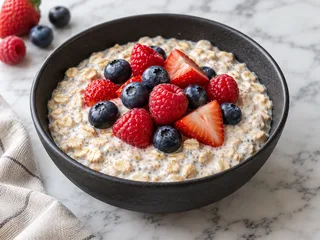
Overnight Oats
Cooked
Free and open source · Runs on your server
Merran is a meal planner for your household that runs on your own server, with an optional AI cooking assistant. Import recipes, plan the week, track pantry amounts, and send shopping lists to supported store carts when connected.
Thursday, October 15
 AI photo
This week
12 of 14 planned
Saturday's dinner is open
Shopping
14 to buy · about $79
Chicken thighs, paneer and limes
Use soon
Spinach
Tomorrow, and 3 more
Tomorrow
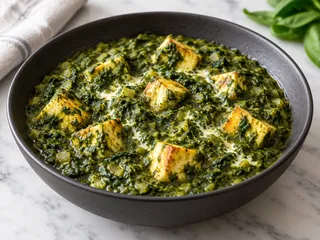
Saag Paneer
Dinner · Meatless night
Saturday
Nothing planned
Plan it
Sunday
Lemon Ricotta Pancakes
Breakfast

Miso Salmon
Made Sep 30

Creamy Tomato Soup
Made Sep 21

Thai Basil Chicken
Made Sep 28
128 recipes, everything you cook in one place.
Chicken thighs on sale
Salmon on sale
This week, Oct 11 – 17
Overnight Oats
Cooked
Chicken + Rice with Peanut Sauce
On the list · 4 servings · 35 min
Saag Paneer
On the list · 4 servings · 40 min

Buttermilk Pancakes
4 servings · 25 min
14 to get across 2 lists
SMJAJamie is on the list too. Changes show up as you go.
11 left · 2 in the cart · about $48.20
Saving about $6.40 with 3 sales
3 left · about $31.00
Meat in bulk, and the soda
34 things at home, 4 to use soon
4 things to cook before they turn.
Keep recipes, plans and shopping connected, with optional AI when you want a hand.
How it fits together
Choose meals, add their ingredients to the list, and account for pantry stock. Put purchases away, then mark planned meals cooked to deduct their recorded stock. Optional AI can help along the way.
1 · Recipes
Import a recipe page or type one in. Optional AI reads pasted text, photos and PDFs; video imports also need the video module. Review the result before planning dinner. Read the Recipes guide →
A batch imports one link at a time in a server job. It carries on after you close the page; individual links can fail or be skipped.
Moving from Mealie? Import a backup or export under Settings → Import and export → From another app. Direct connection also requires server-admin access. Read the migration guide →
Swaps that work in this recipe, with what you have first.
½ cup tomato sauce
1 pinch sugar
Simmered down so it thickens. A little brighter than paste.
Changes a step
Step 2: Stir in the tomato sauce, sugar and red pepper flakes, and simmer 12 to 15 minutes, until thick.
2 tbsp ketchup
Sweeter and tangier. Leave out any sugar.
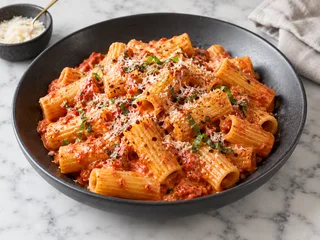
Soften the shallot and garlic in the olive oil, about 3 minutes.
Stir in the tomato sauce, sugar and red pepper flakes, and simmer 12 to 15 minutes, until thick.
Add the cream, then the rigatoni and parmesan, loosening it with pasta water.
Try it: press Use this time. The swap lasts for this cook and carries into the cook view; Save to recipe keeps it, with the old version under Versions.
Buttermilk Pancakes
25 min · Breakfast
Try the sample servings and Metric controls. This example converts flour at 120 g per cup; real conversions depend on recognized foods and units.
Spinach simmered with ginger and garam masala, with golden paneer.
Not dairy-free or vegan
Ruled out by 8 oz paneer and ½ cup heavy cream.
How it adds up
Illustrative Fry's prices, for example products you might buy there.
Labels depend on recognized ingredients and are not allergy guarantees. Nutrition needs available data or configured USDA/AI access; costs appear when product prices are available. Figures shown here are illustrative.
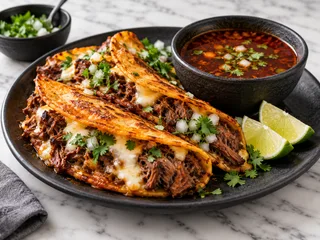
RecipeTin Eats · 2 days ago
Beef braised in a chile broth, crisped in tortillas and dunked in the consommé. · 3 hr 30 min
With recipe-site feeds enabled, Merran periodically looks for recipe entries. Results depend on each feed; review what you import.
2 · Plan
Fill the week suggests meals from your library without AI. Tastes, recent meals and time limits shape the choices; pantry stock and available price data can influence them. Review before adding. Keep flexible meals in the week's Any day pool, or repeat last week into empty slots. Read the Planning guide →
Next week, Oct 18 – 24 · ideas for the 4 open dinners
Try the sample re-roll and add controls. Real suggestions prefer matching themes and available pantry stock; neither is guaranteed.
Settings → Household → Theme nights. Matching dinners are preferred; another eligible meal can be suggested if none fit.

Fish Tacos with Lime Crema
4 servings · 25 min
Miso Salmon
4 servings · 20 min
Left empty on purpose.
Themes can be tacos, pasta, pizza, soup, stir-fry, meatless, fish, something new, something quick, any tag of your own, or leftovers and eating out.
Fills the week ahead's empty meals by your tastes and rules. Anything already planned is left alone.
A missed run can fill remaining days after a restart; a week already past is skipped. Adding to a shopping list does not send it to a store.
3 · Shop
Combine recognized quantities, account for pantry stock, and check purchases off together. Put away checked food to update the pantry. Store connections are optional; checkout stays with the retailer. Read the Shopping and pantry guide →
Oct 18 – 24 · 5 meals aren't on the list yet
18 things go on the list
Amounts add up across recipes: 1 onion + 2 onions is 3 onions.
Left off, because you have them
Always on hand
Grouped by aisle, with configured weekly items included. Assign items to stores yourself; the example split is not an automatic retailer decision.
Fry's, Ray Rd · prices for today
Chicken thighs · 2 lb
Kroger Boneless Skinless Chicken Thighs, 2.5 lb · Aisle 14
Paneer · 8 oz
Nanak Paneer, 12 oz · Aisle 9
Heavy cream · 1 pt
Kroger Heavy Whipping Cream, 1 pt · Dairy
Limes · 3
Limes, each × 3 · Produce
Ginger · 1 piece
Ginger root, sold by the pound · Check how many
This sample does not contact a store. Costco uses search links; Walmart cart filling is experimental and requires the extension. Real Kroger sends cannot be undone from Merran; review or remove products at the retailer.
Food is ticked. Household things aren't.
Whole milk · 1 gal
On your listGV WHL MLK 1GALChicken thighs · 2.5 lb
CHKN THGH BNLSLimes · 3
On your listLIMES @ 3/1.00Spinach · 10 oz
SPINACH 10OZPaper towels
BOUNTY PT 6RLSuggested use-by dates are editable estimates. Check the package, storage conditions and actual food; a receipt scan cannot determine freshness.
Chicken + Rice with Peanut Sauce
Tonight · 4 servings
Marking it cooked takes out what it used, scaled to the servings planned.
Try the sample deduction. Comparable amounts are subtracted; unmeasured food reserved for this meal can be used up. Back to planned restores recorded deductions.
4 · Cook
Big steps, ingredient checklists, and timers from recognized durations. Screen wake lock and hands-free commands depend on your browser. Read the Cooking guide →
Try the sample steps, timers and checklists. Voice commands and saved notes are simulated here; no microphone or AI provider is used.
In the middle · Assistant
Scripted conversations, not live AI responses. Example approvals only change this preview.
Set up optional AI → · What leaves your server →
It's available throughout the signed-in app, and it can see your recipes, plan, pantry and list. It starts with your library, searches the web when you ask when the model supports it, and offers cards for you to approve proposed kitchen changes. How proposals work →
And the rest
Useful details, grouped by where they fit. Open a collection to explore.
Ingredient-based labels with explanations and corrections. Check ingredients yourself; labels are not allergy guarantees. Recipe labels →
Convert recognized foods and quantities to metric or US units, using food-specific weights when available. Scaling and units →
Mix and match sauces and sides, so “chicken + rice” isn't saved a hundred times over. Recipe pairings →
Select recipes, meals or list items for supported bulk actions. Undo is available for supported changes, not every operation. Organize recipes →
Recipes can be restored from Recently deleted before cleanup after 30 days. Restoring a recipe does not promise to recreate removed plan entries. Recipe recovery →
Inspect earlier saved versions and go back to one while keeping the current version in history. Editing recipes →
Imported values, USDA calculations with a key, or optional AI estimates. Daily plan totals depend on recipe coverage and servings. Nutrition requirements →
Estimated recipe costs from known product prices. A weekly budget influences suggestions; it is not a spending cap. Prices and budgets →
Yours and your parents', each with its own recipes, plan and list, on one server. Household roles →
Use device speech, run optional Kokoro on your infrastructure, or configure paid OpenAI speech. Browser support and voice availability vary. Voice setup →
Sage & Cream, Paprika & Linen, or Cast Iron & Saffron, in light or dark. Try them up top. First-run setup →
Connected household devices refresh when the list or plan changes, with presence indicators on those pages. Shared shopping →
Import readable content from the page you have open. Requires extension setup and site access; experimental Walmart cart filling is optional. Import methods →
Use a supported Android share sheet or set up an iPhone Shortcut. AI and video requirements still apply; receipts wait for review before pantry changes. Share and import →
Import supported Mealie or Paprika files, and export a Merran household archive for portability. Keep a separate full-server backup. Backups and recovery →
Create scoped API keys and use the generated endpoint reference to build integrations. API quickstart →
Optional AI Tidy up proposes changes for you to inspect and apply. Review and approvals →
Generate images for recipes without a photo in a household style. Off by default; eligible OpenAI or Google access and provider charges apply. AI requirements →
Coming from Mealie?
Both projects cover recipes, planning and shopping. Merran connects those with measured pantry stock, optional store carts and an assistant that proposes changes. Mealie also has AI imports and a broad integration system; those are not unique to Merran.
Settings → Import and export → From another app. Household admins can import supported files; a direct connection also requires server-admin access.
Photos and recipe metadata depend on the source export. Review the import summary and sample recipes; this is a migration, not ongoing synchronization.
Migration steps →| Workflow | Mealie documentation | Merran implementation |
|---|---|---|
| Recipe entry | Website and manual entry; AI imports from URLs, videos, images and text | Website and manual entry; optional AI for text/photos/PDFs and video extraction |
| Meal planning | Calendar, per-meal servings, notes and planner rules | Per-meal servings, theme preferences, Fill the week and optional scheduled planning without AI |
| Shopping | Recipe-linked lists, editable quantities and labels | Combined quantities, pantry deductions, purchase put-away and optional supported store connections |
| Households | Isolated groups; households within a group share recipes | Separate household recipes, plans, lists and pantry; owner/admin/member roles |
| Integrations | API, notifiers, webhooks and recipe actions | Scoped API keys, generated API docs, share intake and browser extension |
| Backups | Built-in system backup management | Household export for portability; server backup and restore managed by the operator |
Sources: Mealie's official feature guide and AI setup; Merran's implementation-audited guides. This is a selected comparison, not a complete feature inventory or a claim about a particular released version. Merran release verification is still pending.
Self-hosted
docker compose upThe build targets Linux AMD64 and ARM64 Docker hosts. The default app container uses SQLite; Postgres is supported as a separate database service. Application data is stored on your server; optional external services receive the content they process. Saved provider keys are not returned to the browser. Read about data flow →
--profile voice and configure the Kokoro address in
Settings.
--profile tunnel.
# On your server
$ mkdir merran && cd merran
$ curl -fsSLO https://raw.githubusercontent.com/merran-app/merran/main/compose.yaml
$ docker compose up -d
# Open http://<your-server>:3000. The setup code is in the log:
$ docker compose logs merran
# One container on SQLite, nothing to fill in
$ mkdir data
$ docker run -d --name merran --restart unless-stopped -p 3000:3000 \
    -v ./data:/data ghcr.io/merran-app/merran:next
# Open http://<your-server>:3000. The setup code is in the log:
$ docker logs merran
merran.compose.yaml into the compose editor. The .env
can stay empty.
http://<your-server>:3000 and enter the
setup code from the logs.
These commands follow the development configuration. Confirm an available release tag before installing; a fresh-release installation has not yet been verified. Installation details → · Backups and recovery →
Your provider or endpoint determines the bill. Merran shows estimated usage, not a live invoice; limits are not a guaranteed billing cap. Manual recipes, structured page imports, planning, lists and pantry tracking work without AI. Understand costs and limits →
| Make a photo for a recipe that has none | Provider image charges |
| Find a recipe online with the assistant | Model usage and search charges |
| Discover with AI | Depends on searches and reading |
| Read a whole recipe aloud in OpenAI's voice | Depends on text and provider pricing |
| Read it aloud with Kokoro | Your hosting costs; no OpenAI reading charge |
Open source
Merran is free software under the GNU AGPL v3. You run the application and create accounts on your own server. Hosting and optional external services can have their own costs.
./data/app. Postgres may be local or external; back up
its database too.
AI features need an eligible provider key or compatible endpoint. Core recipes, planning, lists and pantry tracking work without AI; media features can have additional provider requirements. See the feature requirements →
The container build targets Linux AMD64 and ARM64. Verify the image and requirements for your chosen release. Memory needs depend on workload and optional services; no measured minimum is published here.
Merran is a web app. Supported browsers can install it on the home screen over HTTPS. Android sharing depends on browser support; iPhone sharing requires a Shortcut you configure in Settings. This does not promise offline operation.
Yes. Invite each person with a link and they make their own account. One server can host several households too, each kept separate. Households can use their own AI credentials when policy permits, or eligible shared server keys. Recorded-usage limits are not hard billing caps. Roles and permissions →
Eligible Kroger-family stores use a configured developer app and linked household account. Other stores, including Costco, use search links. Walmart cart filling is an opt-in extension experiment. Availability varies; checkout happens at the retailer.
Open Settings → Import and export → From another app. Household admins can import a backup or recipe export; a server admin who also administers the destination household can connect with Mealie's address and an API token. Re-import skips known recipes rather than syncing edits. Follow the migration guide →
Configure a tunnel, VPN or HTTPS reverse proxy, then set the public URL and trusted proxies for your deployment. Household data requires authorization, but setup, sign-in and some public endpoints are accessible before login. Follow the configuration guide before exposing the server.
Set it up this afternoon, move your recipes over, and let it plan next week.